 La cerradura de llave más segura, Cerradura CAM, Cerradura de cajero automático, Fabricante de cerraduras para máquinas expendedoras – Hacer empresa de bloqueo

Advertising boxes are often distributed across various locations, such as multiple streets, centros comerciales, and neighborhoods.
When using traditional mechanical locks, operators may need to carry a large bunch of keys to replace advertisements in advertising boxes at various locations while working, and the unlocking and key handover processes are cumbersome.

We recommend the electronic IoT advertising box lock M5, which features a “One Key Opens Multiple Locks” feature. This helps bus shelter manufacturers upgrade their products to smarter levels, making operations easier and more efficient.
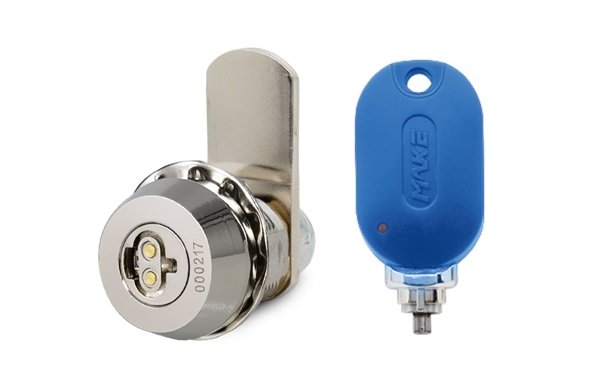
What is “One Key Opens Multiple Locks”?
The M5 is equipped with a software system that grants access rights to keys, allowing them to match the electronic sensors in the locks to unlock. Authorization can be selected for one or more locks.
Operators can use only one key to open multiple corresponding advertising box locks, allowing them to quickly change advertising boxes at multiple locations.

How can one key open multiple locks?
Log in to the MAKE’s Cloud management backend, access the [User Key] page, select the key you want to authorize, click the Authorize icon, select the lock you want to open, set the key validity period, and click the Authorize button. The system displays “Authorization Successful.”
Authorization can be set to either permanent or temporary, applicable to permanent operators and part-time employees, respectively.
Además, if an employee leaves without returning the key promptly, key authorization can be directly revoked to prevent unauthorized unlocking.
With a simple tap of the software, you can flexibly manage changes in personnel, keys, and locks, safeguarding the security of your advertising box.
How to use one key to open multiple locks?
After successful key authorization, follow the steps below to open each lock:
Hold the key upright with your fingers on both sides and insert it into the lock cylinder vertically, keeping it as steady as possible to minimize shaking and vibration.
When the green light turns on and you hear a “click,” turn the key to unlock.
En resumen, the M5 truly achieves “one key, multiple controls,” enabling digital operation and maintenance of advertising boxes.